

With OpenCelium 5.2, we are releasing an update that makes working with complex workflows even easier and more straightforward.
The focus is on new features for managing field references, copying complex workflow logic, and making the workflow editor easier to use. The new field reference overview allows you to view and edit all existing references in one place. At the same time, the automatic remapping of field references ensures that when API methods, IF logic, and loop logic are copied, existing references are correctly carried over or automatically recreated as needed.
In addition, a new onboarding tour makes it easier to get started with OpenCelium. The most important features of the workflow editor are explained using a specific example.
Working with workflows on a daily basis is also more convenient: Connectors can be swapped directly via the context menu, and multiple nodes can now be easily selected with the mouse and moved together.
An Overview of the New Features – OpenCelium 5.2 Release
Overview of Field References
Automatic Remapping of Field References
New UI Onboarding Tour
Gravatar Support for User Profiles
Easy Connector Replacement
Selecting multiple nodes with the mouse
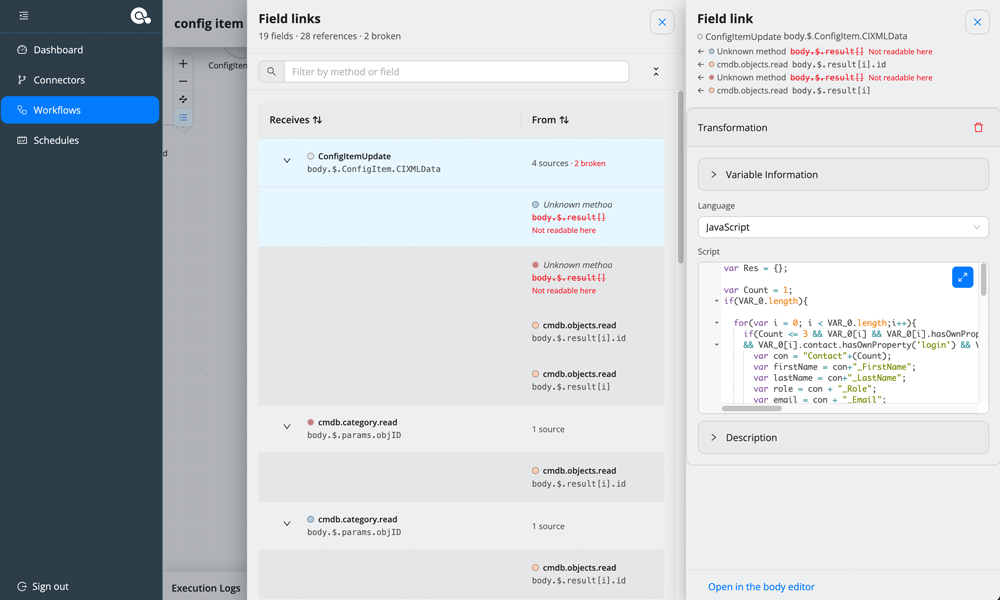
Overview of Field References
In complex workflows, numerous field references can quickly accumulate. To help you keep track of them, there is now a central overview of all existing references.
All field references can be viewed at a glance. This makes it easier to find, review, and edit them as needed.
Especially for workflows with many API methods and dependencies between individual fields, the central overview makes management much easier.
Automatic Remapping of Field References
Copying multiple API methods as well as IF and loop logic becomes significantly easier. When copying, OpenCelium automatically takes existing field references into account and adapts them to the copied elements.
If an existing reference cannot be carried over or a new reference is required, it is created automatically. This ensures that the original workflow logic is preserved even during more complex copying operations.
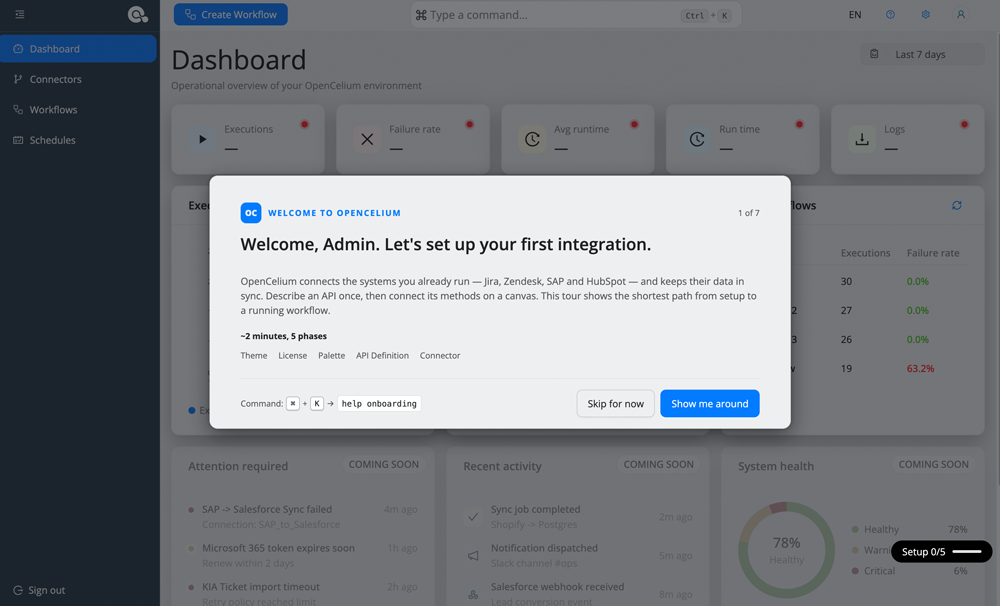
New UI Onboarding Tour
Getting started with OpenCelium is now even easier thanks to a new onboarding tour. Right from the start, a guided tour walks you through the platform’s most important features. It uses a concrete example to explain how to use the workflow editor.
This gives new users a practical introduction to OpenCelium and allows them to get familiar with the basic features right away.
Gravatar Support for User Profiles
There is also a small but useful new feature for user profiles. OpenCelium now supports Gravatar. If a user has a Gravatar profile, the associated profile picture can be displayed within OpenCelium. This makes it easier to distinguish between users within the interface and presents profiles more clearly.
Easy Connector Replacement
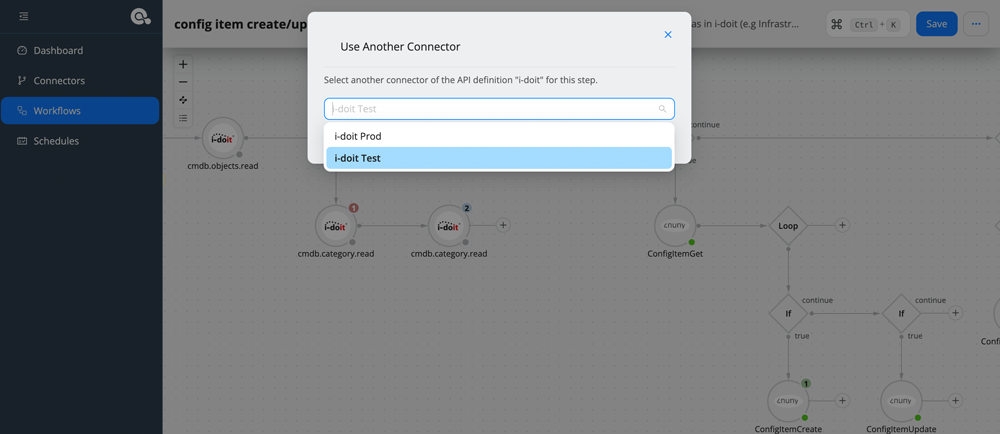
When creating an API method, it is possible that the wrong system connector was accidentally selected.
Previously, the connector had to be changed through the API method’s settings. Now, all you need to do is right-click on the API method: You can replace the connector directly via the context menu.
This allows you to quickly and easily correct an incorrectly selected connector.
Selecting multiple nodes with the mouse
The workflow editor also includes a convenient way to select multiple nodes.
Instead of selecting individual nodes one after another, you can simply drag the mouse to create a selection area over the desired nodes.
All nodes within this area are then selected together and can be moved as a group. This makes it much easier to edit larger and more complex workflows.
Bug Fixes and Improvements
In addition to the numerous new features, OpenCelium 5.2 naturally also includes bug fixes, performance optimizations, and technical improvements. A complete overview of all changes is provided in the changelog.
Follow the instructions in the documentation to perform the update.
Here is the detailed changelog
OpenCelium 5.2 (deutsch)
Neue Funktionen
- Übersicht der Feldreferenzen
- Automatisches Remapping von Feldreferenzen
- Neue UI-Onboarding-Tour
- Gravatar-Unterstützung für Benutzerprofile
- Einfacher Connector-Wechsel über das Kontextmenü
- Mehrfachauswahl von Nodes per Maus
Bugs
[Bug][OC-1539]
Gepufferte Log-Blöcke werden bei fehlgeschlagenen Ausführungen gespeichert
[Bug][OC-1535]
Falscher Ausführungsprozentsatz in der Scheduler-Liste
[Bug][OC-1544]
Connector- und Invoker-Symbole sind bei unterschiedlichen Themes nicht lesbar
[Bug][OC-1545]
Benutzername kann beim Anlegen von Benutzern als Login-ID verwendet werden
[Bug][OC-1546]
Invoker-Dialog scrollt vollständig statt nur den Inhaltsbereich zu scrollen
[Bug][OC-1547]
Konsolenfehler beim Öffnen von Schritt 2 (Authentifizierung) der Invoker-Details
[Bug][OC-1549]
Felder erscheinen in der Invoker-Detailansicht bearbeitbar
[Bug][OC-1553]
Backup-Link im Update-Wizard aktualisiert
[Bug][OC-1570]
Speichern entschlüsselter Connector-Zugangsdaten verhindert
[Bug][OC-1571]
Doppelte Verschlüsselung von Zugangsdaten im findById-Entschlüsselungs-Fallback verhindert
[Bug][OC-1573]
Falsche „Status“-Auswahl im Operator-Condition-Dialog bei Body-Feldern mit .status
[Bug][OC-1643]
Fehler beim Laden des i-doit-OTRS-Templates behoben
[Bug][OC-1582]
Fehler beim Filtern und Auswählen von Feldern in Referenzen behoben
[Bug][OC-1597]
Probleme mit doppelten Anführungszeichen in Request-URLs behoben
[Bug][OC-1609]
Doppelte Requests beim Speichern des Workflow-Namens verhindert
[Bug][OC-1610]
Zugriff auf Nutzungs- und Ausführungsstatistiken ohne gültiges Abonnement verhindert
[Bug][OC-1618]
Leere IF-Operator-Bedingungen nach Upgrade von 4.8 auf 5.1 behoben
[Bug][OC-1631]
Probleme aus internen Tests behoben
[Bug][OC-1632]
Validierung von Template-Bedingungen korrigiert
[Bug][OC-1633]
Mehrfachauswahl und gemeinsames Verschieben von Nodes über Commands ermöglicht
OpenCelium 5.2 (english)
New Features
- Field Reference Overview
- Automatic Field Reference Remapping
- New UI Onboarding Tour
- Gravatar Support for User Profiles
- Easy Connector Replacement via Context Menu
- Multi-Node Selection via Mouse Drag
Bugs
[Bug][OC-1539]
Fix buffered log blocks being stored for failed executions
[Bug][OC-1535]
Fix incorrect execution percentage displayed in the scheduler list
[Bug][OC-1544]
Fix connector and invoker icons not being readable with different themes
[Bug][OC-1545]
Allow username to be used as login ID when creating users
[Bug][OC-1546]
Fix invoker dialog scrolling completely instead of only scrolling the content area
[Bug][OC-1547]
Fix console error when opening step 2 (Authentication) of the Invoker details
[Bug][OC-1549]
Fix fields appearing editable in the Invoker details view
[Bug][OC-1553]
Update backup link in the update wizard
[Bug][OC-1570]
Prevent storing decrypted connector credentials
[Bug][OC-1571]
Prevent double encryption of credentials in the findById decrypt fallback
[Bug][OC-1573]
Fix incorrect “Status” selection in the operator condition dialog for body fields containing .status
[Bug][OC-1643]
Fix error when loading the i-doit-OTRS template
[Bug][OC-1582]
Fix error when filtering and selecting fields in references
[Bug][OC-1597]
Fix issues with double quotes in request URLs
[Bug][OC-1609]
Prevent duplicate requests when saving the workflow name
[Bug][OC-1610]
Prevent access to usage and execution statistics without a valid subscription
[Bug][OC-1618]
Fix empty IF operator conditions after upgrading from 4.8 to 5.1
[Bug][OC-1631]
Fix issues identified during internal testing
[Bug][OC-1632]
Fix template condition validation
[Bug][OC-1633]
Enable multi-node selection and moving nodes together using commands
becon blog
CONTACT
Get in touch with us!
Do you have any questions, suggestions, or requests, or are you facing a particular challenge? We look forward to hearing from you!