

With OpenCelium 5.0, we are releasing the platform’s largest update to date. The focus of this release is the complete redesign of our workflow editor. The previous connections, which were limited to two endpoints, have been transformed into a flexible workflow system that combines any API calls with one another, thereby enabling significantly more complex integrations.
But OpenCelium 5.0 offers much more than just a new editor. The entire user interface has been modernized, a powerful command-line interface (CLI) has been introduced, system configuration can now be managed directly through the UI for the first time, and the dashboard has also been significantly expanded.
At the same time, we are launching a completely revamped service portal, which will serve as the central entry point for customers and administrators going forward.
Of course, OpenCelium 5.0 also includes numerous bug fixes, performance optimizations, and many minor improvements.
An Overview of the New Features – OpenCelium 5.0 Release
Completely New Workflow Editor
Any number of API requests within a workflow
Support for complex and bidirectional integrations
A completely modernized user interface based on Ant Design
New Global Command Interface (CLI)
Editing the application.yml file directly in the interface
New dashboard with graphs showing the last seven days
Live Monitoring of Connector Availability
All-New Service Portal
User, Subscription, and (in the future) Billing Management in the Service Portal
The New Workflow Editor
At the heart of OpenCelium 5.0 is the completely redesigned workflow editor.
Previously, a connection always consisted of exactly one “From” connector and one “To” connector. As a result, integrations were limited to two endpoints. Complex workflows, multiple API calls, or bidirectional processes could only be implemented to a very limited extent.
With OpenCelium 5.0, this concept is completely replaced.
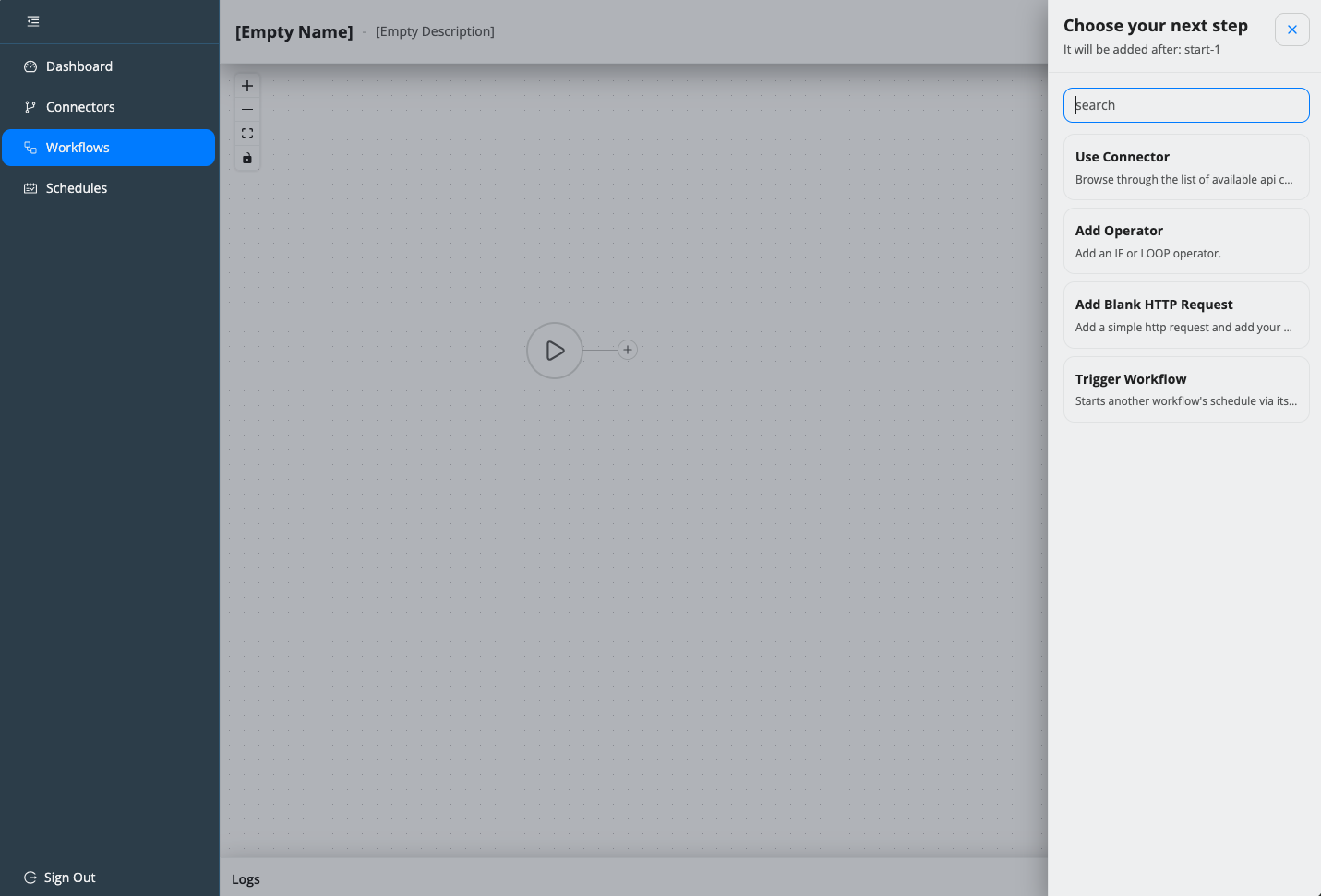
A workflow can now contain any number of steps and combine API requests from a wide variety of connectors. This makes it possible to implement even complex integration scenarios within a single workflow.
The workflow always begins with a starting point. You can then add new elements using the plus button.
A new toolbar will open on the right-hand side, offering the following options:
- API request from any connector
- Operators (familiar from the previous Connection Editor)
- Empty HTTP Request
- Trigger Workflow
The Blank HTTP Request serves as a universal HTTP component. Here, the URL, headers, parameters, and request body can be fully customized, enabling virtually any desired REST integration.
With Trigger Workflow, another workflow can be initiated via a webhook. This allows you to build complex process chains and create reusable workflows.
Live Status of All Connectors
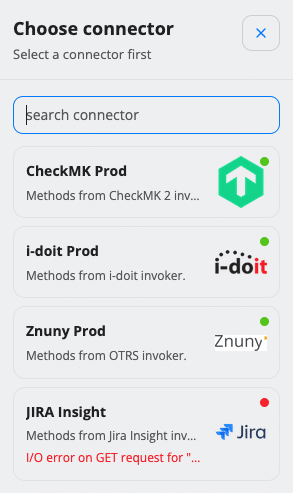
The selection of connectors is continuously monitored.
Even while the workflow is being created, OpenCelium determines whether a connector is currently accessible.
For quick reference, each connector is labeled directly in the list:
- 🟢 Green – Connector is available
- 🔴 Red – Connector currently unavailable
This makes it possible to identify potential problems as early as the workflow creation stage, before it is run in production.
New user interface based on Ant Design
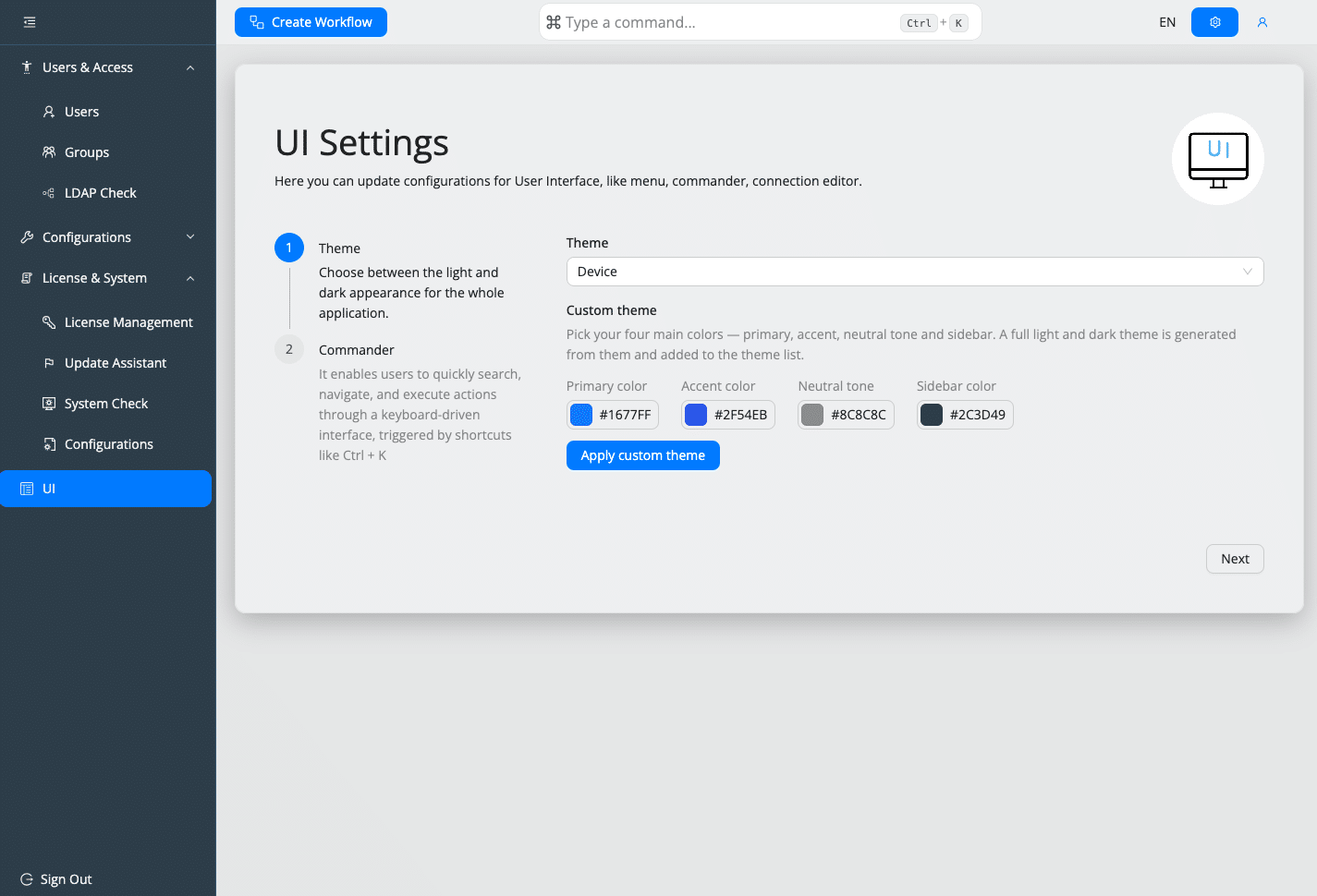
With version 5.0, nearly the entire user interface has been modernized.
The menu navigation has been completely redesigned and now follows the Ant Design guidelines. In addition to a modern look, users benefit from significantly more intuitive navigation and a more consistent user experience across all areas of OpenCelium.
Numerous icons have also been standardized and restructured, making it much easier to navigate the platform.
New Command Line Interface (CLI)
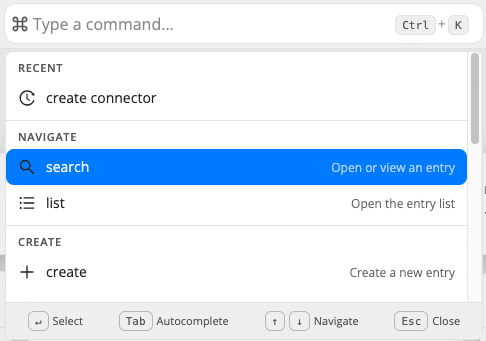
One of the biggest productivity improvements in OpenCelium 5.0 is the new global command interface.
Using a central search and command bar, users can search virtually every part of OpenCelium and perform many actions directly—without having to switch between different pages.
For example, you can create the following directly:
- Connectors
- Invoker
- Users
- Groups
- Workflows
- Other System Elements
The CLI also serves as a global search function.
Within the workflow editor, for example, it can be used to search for individual workflow elements. Even outside the editor, the CLI provides quick access to nearly all areas of the platform.
This makes many workflows significantly faster and more efficient.
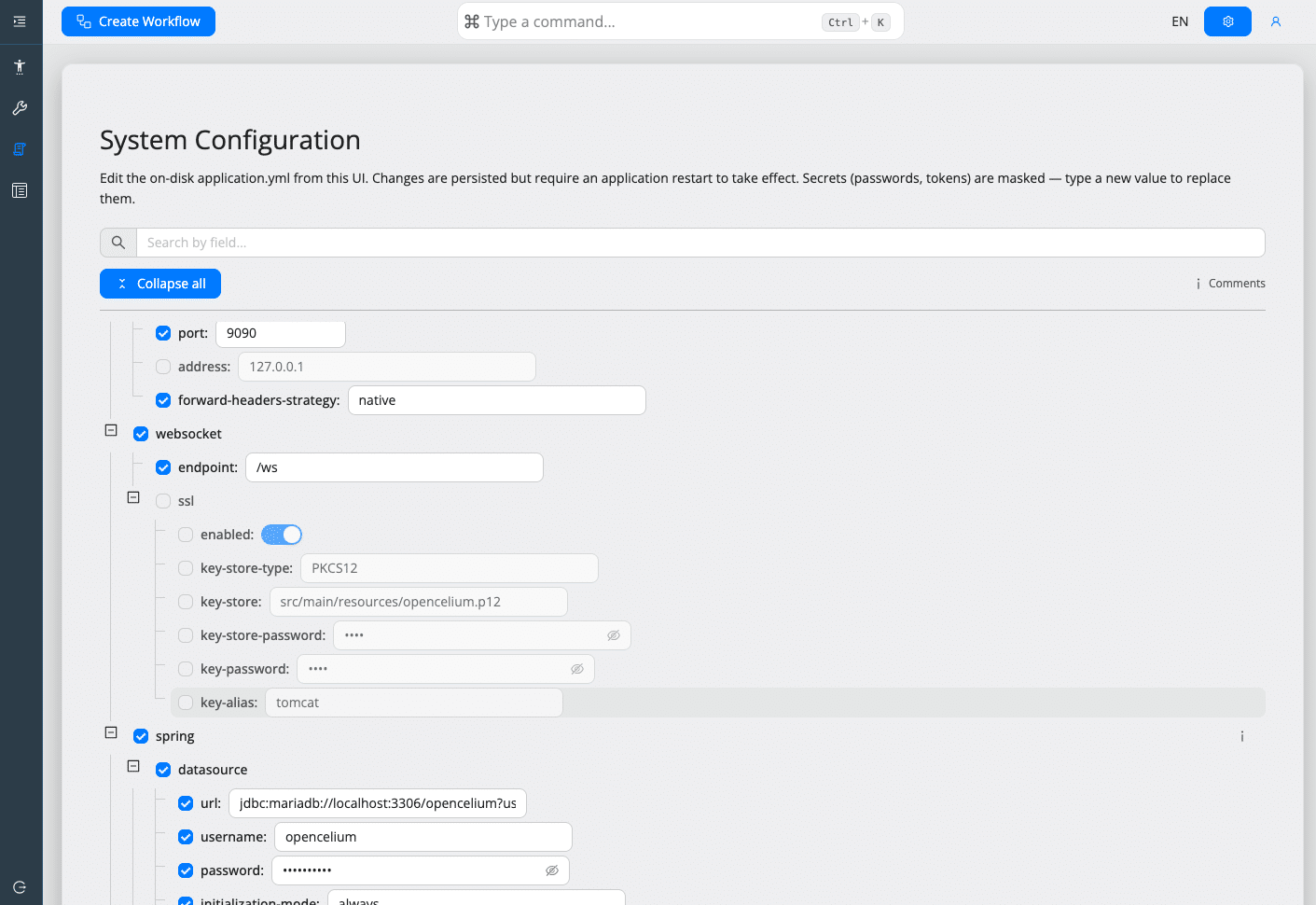
System configuration directly through the user interface
With OpenCelium 5.0, the central ` application.yml ` file can now be edited directly through the user interface for the first time.
Administrators no longer need to access the server to do this; instead, they can conveniently make configuration changes within the web interface.
Currently, a restart of the OpenCelium server is still required for changes to take effect.
Plans are already in place for the upcoming version to allow this restart to be performed directly from the user interface as well, thereby enabling the entire administration process to be handled entirely through OpenCelium.
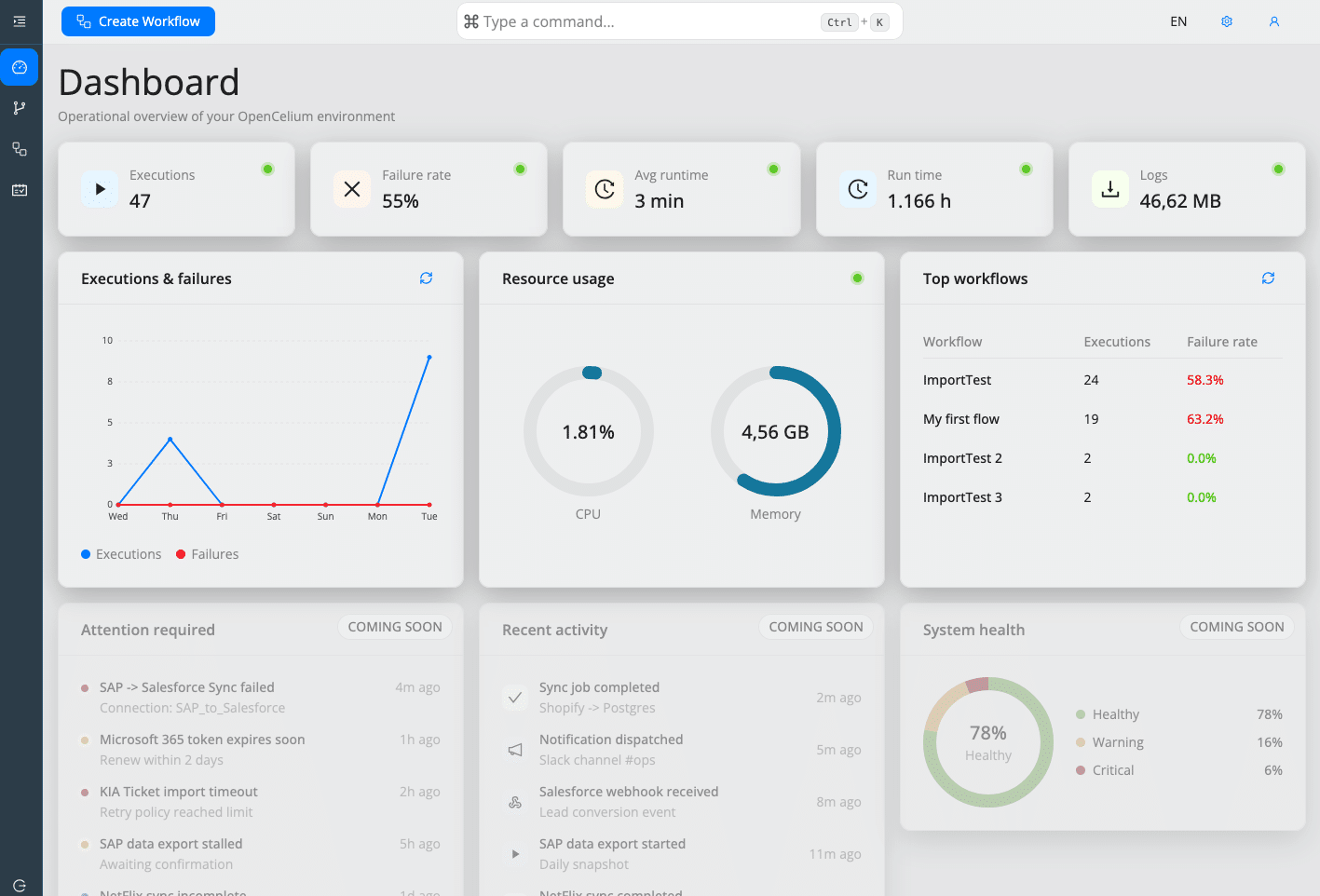
New OpenCelium Dashboard
The dashboard has also been expanded. In addition to the existing metrics, charts covering the past seven days are now displayed, providing a much better overview of the OpenCelium instance’s performance.
In the future, administrators will also be able to select specific time periods. Three additional dashboard widgets are already in development and will be released with upcoming updates.
In addition, we are currently working on two new areas:
- Alert Queue
- Activity Queue
The Activity Queue notifies users of relevant activities within the system.
The Alert Queue highlights critical events and will in the future also be categorized by different severity levels so that administrators can immediately identify important messages.
New Service Portal
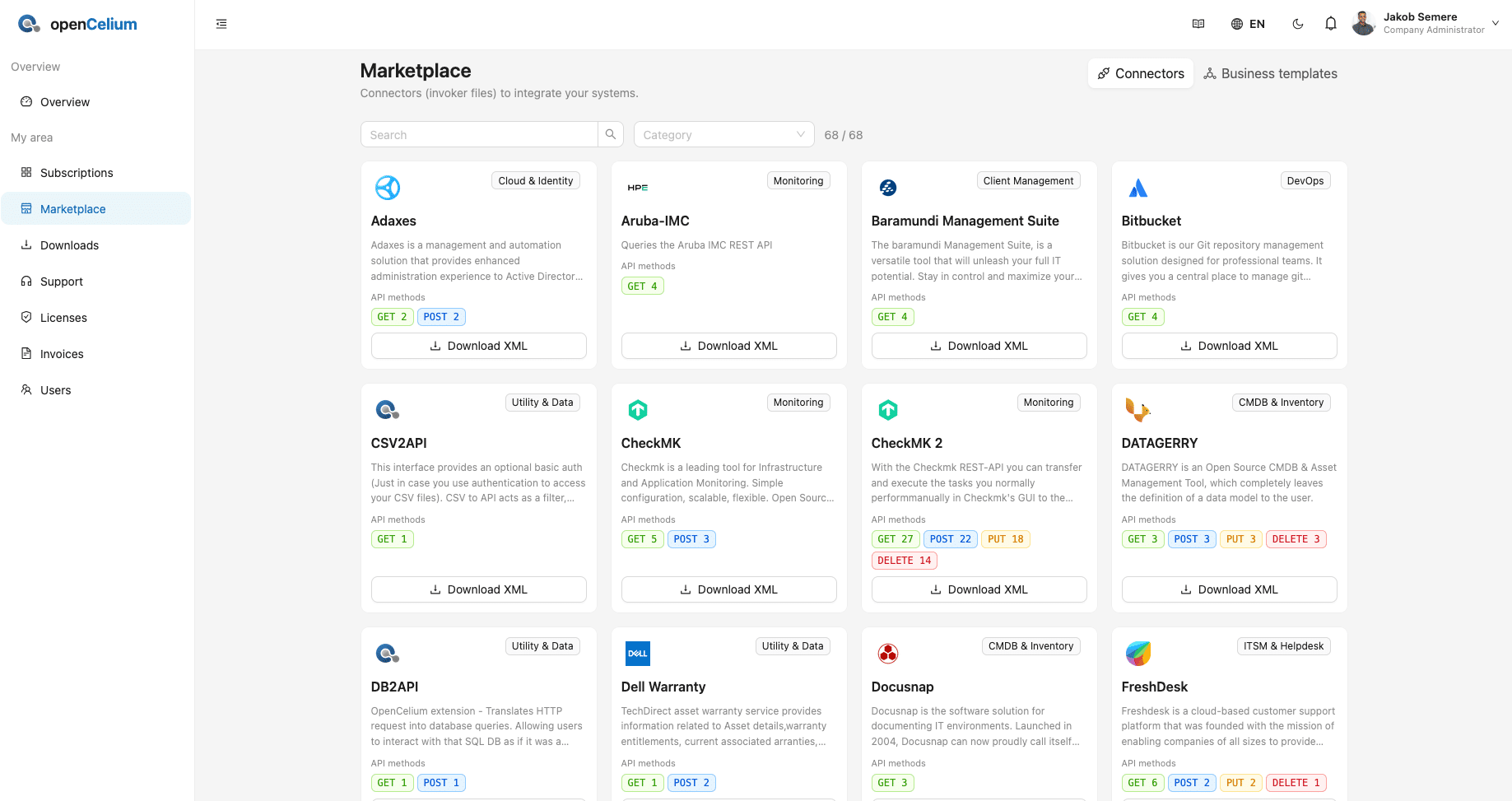
Along with OpenCelium 5.0, we are launching a completely redesigned service portal.
The new portal features a modern design and more intuitive navigation, and will offer significantly more self-service options in the future.
Right from the start, customers can:
- Manage your subscriptions
- Order new subscriptions
- Manage your own users
The Service Portal will be further expanded in upcoming versions.
Plans include, among other things:
- Invoice Summary
- Download Area
- Additional Self-Service Features
As a result, the Service Portal is increasingly becoming the central management platform for OpenCelium customers.
Bug Fixes and Improvements
In addition to the numerous new features, OpenCelium 5.0 naturally also includes many bug fixes, performance optimizations, and technical improvements. A complete overview of all changes is provided in the changelog.
Follow the instructions in the documentation to perform the update.
Here is the detailed changelog
OpenCelium 5.0 (deutsch)
Neue Funktionen
- Neuer Workflow-Editor
- Beliebig viele API-Requests innerhalb eines Workflows
- Unterstützung komplexer und bidirektionaler Integrationen
- Neuer Blank HTTP Request
- Trigger Workflow
- Live-Monitoring der Connector-Erreichbarkeit
- Komplett neue Benutzeroberfläche auf Basis von Ant Design
- Globales Command Interface (CLI)
- Bearbeitung der application.yml über die UI
- Neues Dashboard mit Diagrammen
- Neues Service Portal
Verbesserungen
- Zahlreiche UI-Optimierungen
- Verbesserte Navigation
- Performance-Optimierungen
- Diverse Stabilitätsverbesserungen
Bug Fixes
- [Bug][OC-1404]
Log-Offset wird bei gepufferten Schreibvorgängen während lang laufender Ausführungen nicht gespeichert - [Bug][OC-1430]
Ursprüngliche Verbindungsfehlerursache im ReferenceExtractor bleibt erhalten - [Bug][OC-1395]
Fehler bei der Prüfung leerer Arrays für ConfigItem in OC 4.6.1 behoben - [Bug][OC-1408]
Fehler bei der Migration von Version 4.4 auf 4.5.1 behoben - [Bug][OC-1415]
Unterstützung für direkte Referenzen in URLs hinzugefügt - [Bug][OC-1418]
Fehler bei der Bereinigung der Testverbindung behoben - [Bug][OC-1420]
Fehler bei Loop-Referenzen in Verbindungen behoben - [Bug][OC-1426]
Verbindung verschwindet nach dem Entfernen eines Invokers - [Bug][OC-1427]
Aussagekräftige Fehlermeldung bei nicht kompatiblen Feldtypen hinzugefügt - [Bug][OC-1428]
Fehlende Invoker-Methode in der Methodenliste beim Erstellen einer Verbindung behoben - [Bug][OC-1429]
Fehlerhafte Array-Indexierung beim Binden des ersten Elements (units[]) behoben - [Bug][OC-1431]
Fehlende {% %}-Klammern in IF-Objektausdrücken aus dem UI behoben - [Bug][OC-1435]
Fehler bei der Verwendung von dir-Referenzen in URLs behoben - [Bug][OC-1438]
Fehler beim Löschen von Gruppen im IF-Operator behoben - [Bug][OC-1439]
Fehler beim Löschen von Verknüpfungen im IF-Operator behoben - [Bug][OC-1443]
Fehler bei Root-Objektreferenzen behoben - [Bug][OC-1461]
Migrationsstrategie von älteren Versionen auf OpenCelium 5.0 verbessert - [Bug][OC-1463]
Anwendungsabsturz während Drag & Drop behoben - [Bug][OC-1464]
Drag-&-Drop-Zielbereich funktioniert bei langen Bereichen korrekt - [Bug][OC-1466]
Überlappende Workflow-Elemente nach dem Import älterer Templates behoben - [Bug][OC-1480]
Doppelte Methodenfarben werden korrekt dargestellt - [Bug][OC-1485]
Gemeinsames Verschieben mehrerer mit Strg ausgewählter Knoten behoben - [Bug][OC-1496]
Plus-Symbol des Startknotens verschwindet nicht mehr - [Bug][OC-1504]
Fehler bei der Verwendung von Templates aus dem Service Portal (Version 2.1) behoben
OpenCelium 5.0 (english)
New Features
- New Workflow Editor
- Unlimited API Requests within a Workflow
- Support for complex and bidirectional integrations
- Blank HTTP Request
- Trigger Workflow
- Live Connector Availability Monitoring
- Completely redesigned UI based on Ant Design
- Global Command Interface (CLI)
- Edit application.yml directly from the UI
- New Dashboard with Graphs
- New Service Portal
Improvements
- Various UI improvements
- Improved navigation
- Performance optimizations
- Stability improvements
Bug Fixes
- [Bug][OC-1404]
Log offset not persisted to DB during buffered writes for long-running executions
- [Bug][OC-1430]
Preserve original connection error cause in ReferenceExtractor instead of overriding it - [Bug][OC-1395]
Fix array emptiness check for ConfigItem in OC 4.6.1 (type mismatch error) - [Bug][OC-1408]
Error during migration from 4.4 to 4.5.1
- [Bug][OC-1415]
Add support for direct references in URLs - [Bug][OC-1418]
Test connection cleanup fails - [Bug][OC-1420]
Loop ref is null in connection
- [Bug][OC-1426]
Connection gone after removing Invoker - [Bug][OC-1427]
Return a clear error message when field types do not match - [Bug][OC-1428]
Fix missing invoker method in connector method list during connection building
- [Bug][OC-1429]
Fix incorrect array index format in fieldBinding when binding first units[] element - [Bug][OC-1431]
Fix IF object expression missing {% %} wrapper when created from UI - [Bug][OC-1435]
Error when using dir ref in URL
- [Bug][OC-1438]
Fix delete group in If Operator - [Bug][OC-1439]
Fix delete conjunction in If Operator - [Bug][OC-1443]
Fix root object reference
- [Bug][OC-1461]
Migration strategy from old to 5.0 version - [Bug][OC-1463]
Application craches during Drag & Drop - [Bug][OC-1464]
Drag & Drop edge zone does not work if it is long - [Bug][OC-1466]
After uploading old template the workflow elements position is on each other - [Bug][OC-1480]
Fix duplicated method color bug - [Bug][OC-1485]
Fix selected nodes with ctrl are not movable together
- [Bug][OC-1496]
Plus icon from initial node disappears - [Bug][OC-1504]
Fix an error when using template from service portal (version 2.1)
Day(s)
:
Hour(s)
:
Minute(s)
:
Second(s)
becon blog
CONTACT
Get in touch with us!
Do you have any questions, suggestions, or requests, or are you facing a particular challenge? We look forward to hearing from you!